

If you run a business today, your Google Business Profile is like your digital shop window — it’s often the first place people look before deciding to visit or reach out.. Whether you’re a local café, a solar energy company, or a digital agency, this little box on Google can shape how potential customers see you—and whether they choose you.
So, how can you make the most out of it and really stand out to potential customers? Let’s break it down into three key parts: how to customize it, how to edit it, and how to improve it so your business shines online.
1. How Do I Customize My Google Business Profile?
Customizing your profile means shaping how your business appears when people search for it. This is more than just filling in the basics—it’s about standing out.
Here’s how to make it uniquely yours:
Add your logo and cover photo – This is your brand identity. Make use of top-notch photos that capture the essence of your company.
Add pictures of your company. Display your office, staff, shopfront, or behind-the-scenes activities. Real images build trust.
Write a compelling business description – Use clear, friendly language. Communicate your identity, the services your company provides, and the reasons you are the best option.
Choose the right category – Be specific! Instead of just “Consultant,” go for “Solar Energy Consultant” or “Digital Marketing Agency.”
Add services and products – Let people know exactly what you offer. This helps with search visibility and saves your customers time.
Tip: Think of your profile as your “first impression.” Make it welcoming and informative!
2. How Can My Google Business Profile Be Edited?
Editing your profile is easy—and you should do it regularly to keep things fresh and accurate.
Here’s how:
Go to Google Search or Maps
Just type your business name while signed in with your business email.
Click “Edit Profile”
This allows you to update your contact details, including your address, phone number, website, and hours.
Keep your hours up to date—especially during holidays or special events—so customers always know when to stop by.
Keeping this accurate avoids frustration and builds credibility.
Respond to reviews
Show your customers you care. Thank them or address concerns openly.
Add new photos or posts regularly
This keeps your profile active and engaging.
Reminder: Google rewards profiles that are active and complete. Stay on top of it!
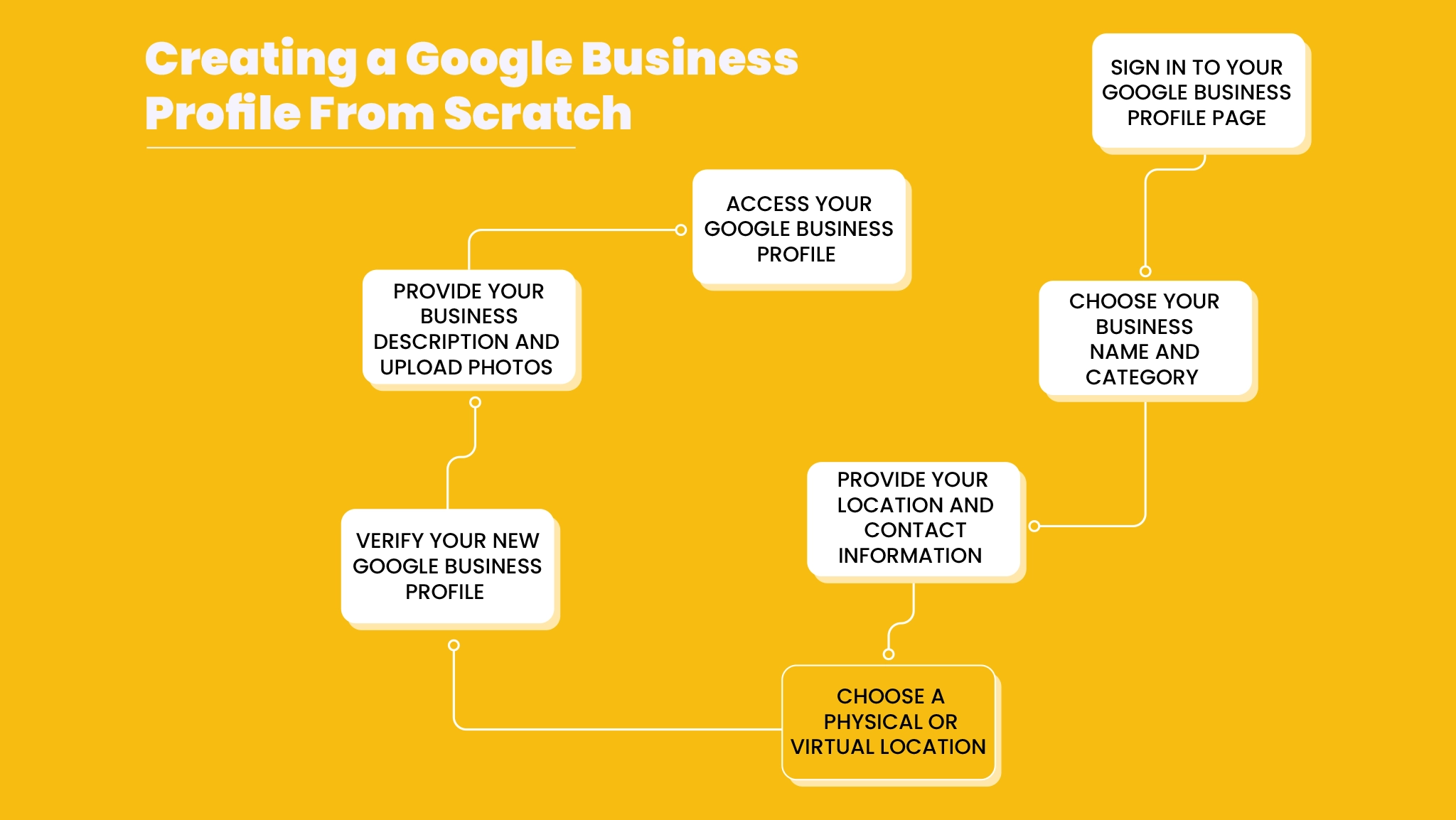
3. How Can I Improve My Business Profile on Google?
Once your profile is set up, improving it is about maintaining consistency, engaging your audience, and using data to grow.
Here’s what works:
Ask happy customers for reviews
Social proof builds trust. Getting regular reviews shows people that your business is active, trusted, and worth checking out.
Use keywords in your description
Think about what your customers would search. For example, “affordable solar panel installation in [Palakad].”
FAQs
Think about what your customers usually ask and answer those questions right on your profile.
Post updates, offers, or news
Share special deals, blog content, or company updates. It keeps customers engaged and informed.
Check insights regularly
Google provides you with useful information on how users find your profile and what they do after finding it. Use this to improve
Make Your Google Business Profile Look Great and Rank Higher (For Free)
Customers may find and connect with your business with the help of your Google Business Profile (previously Google My Business), a useful and cost-free tool. Whether you run a salon, a cafe, or a service company, your profile plays a major role in how people see you online.
Let’s break it down into three simple topics: Is it free? How do you make it look great? And how can you rank higher in search results?
Is Google My Business Profile Creation Free?
And yes, setting up your Google Business Profile won’t cost you a thing—it’s totally free!. You don’t need to pay anything to get listed on Google Search or Maps.
Why it’s worth creating:
Reach more local customers searching for your services.
Control your business info, like hours and location.
Show reviews and build trust online.
Post updates, offers, and photos for free.
Obtain information on how customers locate your company.
To set it up, all you need is a Google account and a few minutes.
How Do I Make My Google Business Page Look Good?
Looking good online makes people more likely to trust and choose your business. A polished profile shows that you’re active, professional, and ready to help.
Steps to make your profile stand out:
Add a clear logo and high-quality cover photo
Your visual branding makes the first impression.
Post real business photos
Include pictures of your workspace, team, or products.
Write a clear and friendly business description
Describe yourself, what you do, and why you should be chosen.
List your services or products
Assist clients in quickly understanding what you have to offer.
Update business hours and contact info regularly
Make sure everything is accurate, especially during holidays.
Reply to customer reviews
Thank your happy clients and respond politely to concerns.
Think of your profile as a virtual handshake—make it welcoming and informative.
How Can I Improve My Google Business Profile Ranking?
Ranking higher means your business appears near the top when people search for what you offer. Google rewards profiles that are complete, active, and trustworthy.
Boost your ranking with these tips:
Complete every section of your profile
Don’t skip anything—more info means better results.
Use relevant keywords
In your description and services, include search terms like “best electrician in Chicago.”
Collect and respond to reviews
Encourage happy customers to leave feedback. Every review helps build credibility.
Post updates weekly
Share news, events, offers, or helpful tips to stay active.
Choose the right business category and service areas
Being specific helps Google show your profile to the right people.
An active and optimized profile increases visibility and builds trust with potential customers.
Take a few minutes today to improve your profile—you never know who might be searching for your services right now.
How Do I Edit Highlights on My Google Business Profile?
Your Google Business Profile is one of the first things people see when they search for your company online. It gives potential customers a quick snapshot of what your business offers, how trustworthy you are, and why they should choose you.
One of the most helpful but often overlooked features is the “Highlights” section. These small icons or badges—like “Women-owned”, “Black-owned”, or “Wheelchair accessible”—help customers quickly understand what makes your business unique.
Let’s break down what highlights are, how to edit them, and why they matter.
What Are Highlights on a Google Business Profile?
Special features that show up on your Google listing are called highlights. They are meant to show what makes your business stand out or to communicate important accessibility or identity-based info.
Some common examples:
Women-owned business
Black-owned business
Veteran-led
Wheelchair accessible
Outdoor seating
Cash-only
Appointment required
These highlights appear as icons on your profile and are visible to anyone searching for your business.
Think of highlights as your “extra details”—they quickly tell customers what makes your business personal and inclusive.
How Do I Edit Highlights on My Google Business Profile?
Editing your highlights is simple, but you need to have access to your Google Business account.
Step-by-step guide:
Go to Google Search or the Google Maps app
Please ensure that you are logged in using the Google account associated with your company.
Type your business name in the search bar
Click or tap “Edit profile”
Choose the “More” or “Business information” section
Scroll to find “Attributes” or “Highlights”
Select the highlights that apply to your business
You’ll see a list of available options based on your business category.
Simply check or uncheck the ones you want to add or remove.
Save your changes
Once saved, Google will review and publish the updates—usually within a few minutes to a few hours.
You can come back and change your highlights anytime—especially if your offerings or business identity evolves.
Why Are Highlights Important?
Adding highlights does more than just “look good”—they help customers feel confident about choosing your business. People often search for businesses that align with their values or meet specific needs.
Benefits of using highlights:
Build trust with new customers
Showcase your values (like being women-owned or eco-conscious)
Improve accessibility awareness
Make use of helpful visual cues to make your presence known in search results.
Encourage more clicks and calls by offering clarity at a glance
Consumers value openness and inclusivity; highlighting your efforts demonstrates your concern.
Certainly! Here’s your *500-word article* on *“How do I access my Google Business Profile?”, with **Final Thoughts removed* and a clean, human-friendly tone, including bullet points:
How Do I Access My Google Business Profile? (Simple Guide for Business Owners)
Your *Google Business Profile* is one of the most important tools for connecting with local customers. Whether people are searching on Google Search or Google Maps, your profile helps them find your location, read reviews, see photos, and decide whether to contact or visit you.
But before you can update or manage anything, you need to know *how to access your profile*.
Here’s a simple, step-by-step guide that shows you exactly how to find and manage your Google Business Profile, even if you haven’t done it in a while.
—
What Is a Google Business Profile?
It’s your *free business listing* on Google, designed to show key details about your business when someone searches for it online.
It includes:
* Business name
* Location and service area
* Operating hours
* Phone number and website
* Customer reviews
* Photos and highlights
Think of it as your online storefront—where people can learn about your business before they even visit.

For daily inspiration, follow our journey on Instagram and stay connected!
How Do I Access My Google Business Profile?
Accessing your profile is easy once you’re logged into the Google account associated with your business. You can do it through either *Google Search* or *Google Maps*, depending on what’s convenient for you.
—
Option 1: Access via Google Search
1. *Go to Google.com* on your desktop or mobile device.
2. *Type your business name* into the search bar.
3. If you’re signed in with the correct account, you’ll see a business dashboard appear at the top of the page.
From there, you can:
* Edit your business information
* Add updates or offers
* Upload new photos
* Respond to reviews
* View insights about customer activity
This is the fastest way to access and manage your profile on the go.
—
Option 2: Access via Google Maps App
1. Open the *Google Maps* app on your smartphone.
2. Press the *profile icon* in the top right corner.
3. Select *“Your Business Profiles”* from the menu.
4. Choose the business you want to manage.
This lets you:
* Change your business details
* Post real-time updates
* See customer engagement
* Add photos right from your phone
This method is perfect for business owners who prefer managing things from their mobile devices.
—
Can’t Access Your Profile?
If you don’t see the dashboard when you search your business:
* Make sure you’re logged into the *correct Google account*
* Try using both Search and Maps methods
* Go directly to [https://business.google.com](https://business.google.com) and sign in
If you still don’t see your listing, you might need to claim it or verify ownership.
Tip: If someone else set it up for you, request access through the profile page.
How Can I Update My Google Business Profile Using SEO?
You’ve undoubtedly heard the phrase “SEO” (Search Engine Optimisation) a lot if you own a business. But did you know you can apply SEO techniques to your Google Business Profile to boost your visibility in local searches?
Good SEO on your Google Business Profile means more people can discover your business when they search for services or products you offer — especially in your area. And the best part? You don’t need to be a tech expert to do it.
Here’s a simple guide to help you improve your local SEO and attract more customers.
What Is Google Business Profile SEO?
In short, it’s the process of optimizing your business listing so it appears higher in Google Search and Google Maps results — especially when people search using terms related to your services, location, or industry.
Better SEO = better visibility = more customers.
How to Improve the SEO-Friendliness of Your Google Business Profile
Here are proven and beginner-friendly ways to add SEO to your Google Business Profile:
1. Use Keywords in Your Business Description
When writing your business description, naturally include words people would type into Google to find your service.
For example:
“Family-owned Italian restaurant in downtown Dallas.”
“24/7 emergency plumbing services in Phoenix.”
Avoid keyword stuffing — just write naturally, but thoughtfully.
2. Choose the Right Business Category
Google lets you pick a primary category and additional subcategories. Choose the most specific ones that fit your business.
Example:
Primary: “Bakery”
Additional: “Wedding cake shop,” “Cupcake shop”
This aids Google in matching the appropriate search terms with your company.
3. Complete Every Section of Your Profile
Google prioritizes complete listings, so don’t skip details. Make sure you fill in:
Business hours
Phone number
Website
Service area (if applicable)
Services and products
The more complete your profile, the higher your chances of ranking well.
4. Upload High-Quality Photos
Google loves fresh, original content — and so do your potential customers.
Tips:
Upload pictures of your storefront, team, products, or services.
Add new photos regularly.
Use clear, well-lit images.
5. Collect and Respond to Reviews
Reviews are a huge trust signal for Google. Request positive reviews from satisfied clients, and be sure to reply to each one.
Even a short “Thank you!” reply shows you’re engaged.
6. Use Google Posts for Updates
Posting regularly (offers, news, or events) shows Google your business is active. It also gives searchers more reasons to click on your listing.
Try to post weekly or bi-weekly.
Bonus Tip: Add Local Keywords
Mention neighborhoods, cities, or landmarks in your description or posts if you serve specific areas.
Example: “Serving downtown Austin, South Congress, and East Austin since 2015.”
Final Thoughts
Optimizing your Google Business Profile with SEO techniques doesn’t have to be complicated. Small, consistent efforts — like using the right keywords, adding local content, updating photos, and responding to reviews — can make a big difference in how often your business shows up in search results.
Google will trust and highlight your profile more if you put more work into it. Review your profile and put some of these suggestions into practice today. When potential customers search for you, make sure they come across you first.




No comment