When it comes to establishing a strong professional presence online, LinkedIn stands out as one of the most effective platforms available. Whether you’re job hunting, expanding your network, or seeking new clients, your profile often serves as the first impression. That’s why LinkedIn profile optimization is not just recommended — it’s essential for standing out and making meaningful connections.
However, what does “optimizing” your LinkedIn profile entail? It’s not just about filling in the blanks or listing your job titles. It’s about presenting your professional story in a way that’s clear, authentic, and valuable to the people you want to connect with.
Start With the Basics
A professional profile photo is the first step. It doesn’t have to be taken by a photographer, but it should be clear, well-lit, and show you in a professional setting. Your headline is next — instead of simply stating your job title, think about what you offer. For example, “Helping small businesses grow through effective digital marketing” sounds more compelling than just “Digital Marketer.”
The “About” section is your chance to speak directly to anyone viewing your profile. Use this space to tell your story — what you’re passionate about, what skills you bring to the table, and what kind of work excites you. Keep it friendly and professional. Write in the first person without fear. It helps you sound more approachable.
Highlight Your Experience and Skills
Your experience section should be more than just a list of jobs. For each role, explain what you did, what you achieved, and how it helped the company or project grow. Use bullet points for clarity, and try to include numbers or results when possible. If you helped grow a company’s Instagram following from 1,000 to 10,000, that’s worth mentioning!
Include pertinent abilities in your profile and make an effort to get recommendations from people you’ve worked with. A few well-written recommendations from colleagues or managers can go a long way in building trust with new connections.
What Is the 4-1-1 Rule on LinkedIn?
This is a great question, especially if you’re trying to stay active and share content without being overly promotional. For every six pieces of content you submit, according to the 4-1-1 rule:
Four should be educational or entertaining content from others (like news articles, industry tips, or helpful resources).
-
One can be a soft promotion (like sharing your recent blog post or a behind-the-scenes look at your work).
-
One can be a hard promotion (a direct service pitch or announcement).
-
This maintains your feed’s balance and audience value.
How Can I Make My LinkedIn Profile Better?
Start by reviewing your profile through the eyes of someone who doesn’t know you. Is it clear what you do? Does it reflect your current goals? Is there anything outdated or missing? Be sure to:
-
Customize your LinkedIn URL.
-
Add rich media (videos, PDFs, presentations).
-
Stay active by commenting on posts or sharing insights.
-
Join groups relevant to your industry.
How to Increase Your LinkedIn Profile Views and Get Noticed
Let’s be honest — having a LinkedIn profile is not enough anymore. With millions of professionals on the platform, standing out and getting noticed requires more than just a decent photo and job title. If you’re wondering how to get more views on your profile or how to grab the right kind of attention on LinkedIn, you’re not alone. The good news?A few easy habits and adjustments can have a significant impact.
Optimize Your Profile First
Before you worry about increasing profile views, make sure your profile is worth visiting. Start with a professional photo. People are more likely to click on profiles with a clear, friendly photo — ideally one where you’re dressed appropriately for your industry and look approachable.
Your headline is just as important. Don’t just state your job title. Instead, make use of this space to convey your value. “Helping Startups Grow Through Data-Driven Marketing | Content Strategist | SEO Specialist.” This gives people a reason to click and learn more.
Your “About” section should be a quick summary of who you are, what you do, and what you’re passionate about. Keep it conversational but professional. Use keywords that are relevant to your field, as LinkedIn uses them to match your profile in search results.
Be Active, Not Passive
One of the most effective ways to increase your profile views is by being active on LinkedIn. This doesn’t mean you have to post every day, but regular activity helps boost visibility. Share an article you found useful, write a short post about something you’ve learned recently, or comment on posts by others in your industry.
Engaging with your network keeps your name and face fresh in people’s minds — and often, they’ll click on your profile to learn more about you.
How Do I Increase My LinkedIn Profile Views?
Here are a few practical tips:
Add relevant skills: Profiles with listed skills are more likely to appear in searches.
Connect with intention: Instead of just sending random connection requests, personalize them. Tell them how you found them or why you want to get in touch.
Incorporate hashtags into your postings to expand the audience for your material.
Join and participate in LinkedIn groups: These communities can help expand your visibility and connect you with like-minded professionals.
Make frequent updates to your profile: Having new content shows LinkedIn that you’re engaged, which can improve your search engine ranking.
How to Get Noticed on LinkedIn?
To get noticed, you need to add value.Instead of being a loudspeaker, think of LinkedIn as a conversation platform.Consider LinkedIn to be a discussion rather than a loudspeaker. Here’s what helps:
Share personal insights or professional lessons.
Celebrate milestones or highlight recent projects.
Offer helpful advice or tips in your area of expertise.
Give thoughtful comments on other people’s blogs rather than merely saying, “Nice post!” but something that adds to the discussion.
LinkedIn Profile Optimization Checker + Sample
Let’s face it — in today’s digital-first world, your LinkedIn profile often makes the first impression before you even speak to someone. Whether you’re applying for a job, looking for clients, or networking with industry peers, having a strong and optimized profile can open the right doors.
But how do you know if your profile is actually working for you? That’s where a LinkedIn Profile Optimization Checker can come in handy.
What Is a LinkedIn Profile Optimization Checker?
Think of it as a self-assessment tool or digital guide that evaluates the strength of your LinkedIn profile. It helps you identify missing sections, weak areas, and opportunities to improve your visibility and credibility. Some tools use score systems, while others give tailored recommendations. While online tools exist, you can also manually “check” your profile using a simple checklist.
Here’s a basic LinkedIn optimization checklist to use as your personal checker:
- Professional Profile Photo
- Custom LinkedIn URL
- Keyword-Rich Headline (not just your job title)
- Compelling About Section (written in first-person)
- Updated Work Experience with Achievements
- Relevant Skills (at least 10+)
- At least 2 Recommendations
- Regular Activity (posts, likes, comments)
- Featured Media (projects, links, articles)
- Open to Opportunities or Services
If you’re missing a few of these, don’t worry. The good news is that improving your LinkedIn profile doesn’t require a fancy design — just a thoughtful approach and consistency.
LinkedIn Profile Optimization Sample
(Example)
Here’s a sample of a well-optimized LinkedIn “About” section to give you an idea of what works:
About (Sample):
Hello, my name is Anjali, and I have been assisting startups and small businesses in expanding their online presence for over five years as a content strategist. I specialize in building content that not only drives traffic but also builds trust and engagement.
After starting my career in journalism, I transitioned into digital marketing, where I discovered the power of storytelling in business. Over the years, I’ve worked with tech, education, and lifestyle brands to create blogs, web copy, social media campaigns, and email funnels that actually convert.
I believe great content is about connection — knowing your audience, understanding their problems, and speaking to them in a way that feels human. That’s the approach I take to every project.
Let’s connect if you’re a brand looking to level up your content or just want to exchange ideas over coffee (virtual or otherwise)!
Notice how the tone is friendly, the value is clear, and it gives the reader a reason to connect. It doesn’t feel robotic or stuffed with buzzwords — and that’s the goal.
LinkedIn Profile Optimization AI: How to Optimize Your LinkedIn Profile with ChatGPT
In the digital-first world of today, your LinkedIn profile frequently speaks for you. Whether you’re job hunting, building your personal brand, freelancing, or just trying to grow your professional network, having a strong LinkedIn presence is no longer optional — it’s essential. But with millions of profiles out there, how do you make yours stand out?
This is where LinkedIn profile optimization comes in. And believe it or not, tools like ChatGPT can be incredibly helpful in polishing your profile — as long as you use them the right way.
Let’s walk through what LinkedIn profile optimization really means, how AI fits into it, and how to practically use ChatGPT to make your profile more powerful and personal — without sounding like a robot.
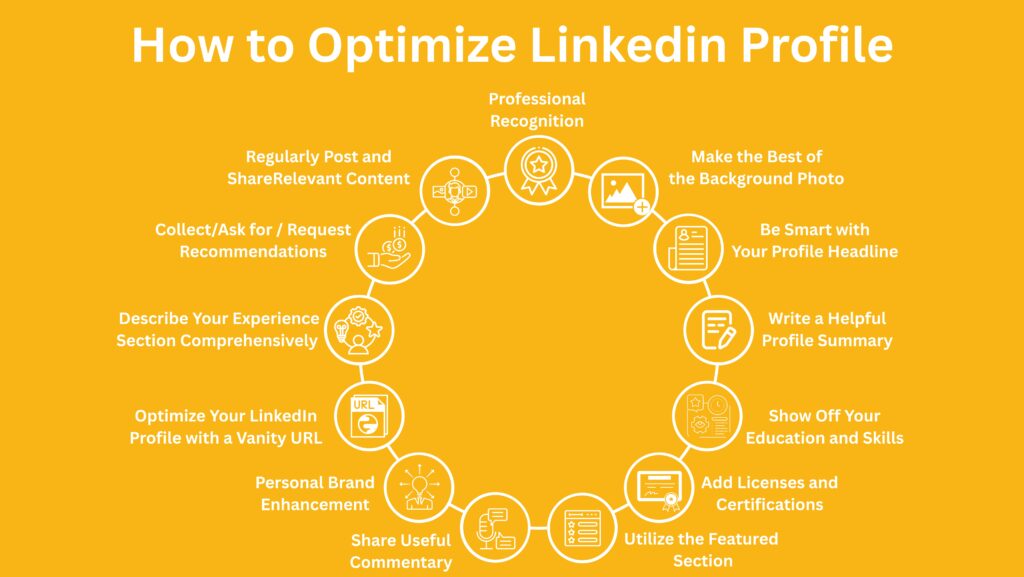
Want to boost your visibility on LinkedIn? Dive into this visual guide for practical strategies, then explore our full course to master profile optimization like a pro!
What Is LinkedIn Profile Optimization?
In simple terms, LinkedIn profile optimization means improving your profile so that it clearly communicates who you are, what you do, and what you bring to the table — in a way that helps you get discovered and taken seriously.
It’s about making your profile:
- Easy to find through LinkedIn search (using the right keywords),
- Easy to read and understand (clear layout and tone),
- Attractive and trustworthy to recruiters, clients, and collaborators,
- an accurate portrayal of your abilities, background, and character.
Consider your digital elevator pitch to be your profile. A fully optimized profile can lead to more profile views, more connection requests, more job or freelance opportunities — and most importantly, the right people reaching out to you.
Why AI (Like ChatGPT) Can Help — If Used the Right Way
Let’s be honest — writing about yourself is hard.
Most of us don’t know where to start when it comes to writing an impactful “About” section or crafting attention-grabbing headlines. That’s where ChatGPT can step in — not to do the job for you, but to help you do it better.
Used correctly, ChatGPT is like having a smart writing partner who helps you brainstorm, structure your ideas, and polish your language. But remember: you’re still the storyteller. The magic happens when you combine AI-powered suggestions with your authentic voice and experience.
How to Optimize Your LinkedIn Profile with ChatGPT: Step-by-Step
Let’s walk through each part of your profile and see how ChatGPT can help make it stronger — while keeping it personal and real.
1. Crafting a Strong Headline
The title is one of the most important components of your profile. It appears everywhere — in search results, comments, connection invites — and it’s your first chance to tell people what you do and how you help.
What not to do:
Don’t just list your job title, like “Marketing Manager.”
Better:
“Helping Startups Grow Through SEO and Strategic Content | Digital Marketer | Brand Storyteller”
Use ChatGPT Like This:
“ChatGPT, help me create a LinkedIn headline that combines my role as a software engineer with my passion for AI and problem-solving.”
You’ll get several headline ideas, which you can tweak to suit your tone.
2. Writing the ‘About’ Section That Sounds Like You
This is where many profiles fall flat. Either it sounds too stiff (like a résumé) or too vague.
The “About” section should be:
In the first person (“I help…”)
Conversational
Focused on value, not just history
Use ChatGPT Like This:
Start with a few bullet points:
-
Who you are
-
What you do
-
What problems you solve
-
What industries you’ve worked in
-
What drives you
Then say:
“ChatGPT, can you turn these bullet points into a friendly, professional LinkedIn ‘About’ section in my voice?”
The result will give you a draft you can fine-tune. You’re not just copying — you’re co-creating.
3. Describing Work Experience That Tells a Story
Listing job titles isn’t enough. Your experience section should focus on what you accomplished, not just what you were responsible for.
Use ChatGPT Like This:
“I was an executive in digital marketing for an eCommerce company. I ran campaigns, worked on SEO, and helped increase sales. Can you write 3 bullet points that highlight these contributions professionally?”
You’ll get impact-driven bullets like:
- Increased organic traffic by 40% through targeted SEO strategies.
- Managed and optimized Facebook and Google Ads campaigns with a 3.5x ROI.
- Collaborated with the content team to improve product descriptions and boost conversions.
You can always adjust the wording to match your personality.
4. Choosing the Right Skills and Keywords
LinkedIn’s algorithm picks up on keywords. That’s how recruiters and clients find you in searches.
Use ChatGPT Like This:
“What are the top LinkedIn keywords for someone working in UI/UX design?”
Or
“List 15 in-demand skills for a cloud engineer on LinkedIn.”
Add these to your Skills section and sprinkle relevant ones into your summary and job descriptions naturally.
5. Getting Help with Recommendations
Writing recommendations — or asking for one — can be awkward. But recommendations add credibility to your profile.
Use ChatGPT Like This:
“Can you help me write a LinkedIn recommendation for my teammate who was a great project manager — super organized, met deadlines, and kept the team motivated?”
You’ll get a thoughtful, professional draft that you can personalize.
Similarly, if you’re asking someone to recommend you, give them a short draft to make it easier — ChatGPT can help you write that, too.
6. Bonus: Creating Content for LinkedIn
Once your profile is optimized, staying active helps you stay visible. Posting your thoughts, sharing achievements, or commenting on others’ content keeps your name in circulation.
Use ChatGPT Like This:
“Can you give me 5 post ideas for a junior software developer trying to build their personal brand on LinkedIn?”
Or
“Write a brief LinkedIn post for me about beginning a new career in content marketing.”
Once more, always make the last tweaks so that you sound like you. Your voice matters more than perfection.
How to Avoid Sounding Like a Robot
Here’s the thing: people can tell when something sounds “off.” AI content is often too polished or generic. To avoid that:
-
Add your own stories or experiences.
-
Use casual language where it feels right.
-
Don’t be afraid to show personality.
Do you sound like yourself when you read your stuff aloud?
ChatGPT is here to support your voice, not replace it. Use it to overcome writer’s block or refine what you’ve written — not to speak for you.

Stay connected and inspired—follow our story on Instagram today!
Final Thoughts
LinkedIn is no longer just a job-seeking tool — it’s a digital reflection of your professional journey. Optimizing your profile doesn’t mean turning it into a marketing ad. It means making it clear, intentional, and human.
With tools like ChatGPT, you can approach profile writing with confidence — even if writing isn’t your strong suit. Use it to explore ideas, build drafts, and polish your message — but always bring your true self to the table.
When you mix AI efficiency with your unique story, that’s when LinkedIn starts working for you — not the other way around.




No comment