

Buffer AI Tool: Revolutionizing Social Media Management with Smart Assistance.
In today’s digital era, social media has become the heartbeat of online marketing. Whether you’re a small business owner, influencer, or digital marketer, creating fresh, engaging content daily can feel like running on a never-ending treadmill. That’s where Buffer AI steps in—a smart, efficient, and user-friendly tool designed to simplify content creation, scheduling, and engagement.
The Buffer AI tool isn’t just about automating tasks; it’s about amplifying creativity. It helps transform scattered ideas into polished, platform-ready posts while saving valuable time. In this article, we’ll explore how Buffer AI is changing the landscape of social media management, what features make it unique, and why it has become a favorite among creators and businesses alike.
What Is Buffer AI?
Buffer AI is an artificial intelligence-powered feature within the Buffer platform, a well-known social media management tool. Traditionally, Buffer allowed users to schedule posts across multiple social platforms like Instagram, Facebook, LinkedIn, and X (formerly Twitter). Now, with the integration of Buffer AI, it goes beyond scheduling—it helps users create, refine, and repurpose content in seconds.
By combining machine learning with user intent, Buffer AI can generate engaging post ideas, rewrite existing content, adjust tone and style, and even tailor messages for specific social platforms. It’s like having your own digital content assistant who never sleeps.
How Buffer AI Works.
1. Integrated Within the Buffer Dashboard
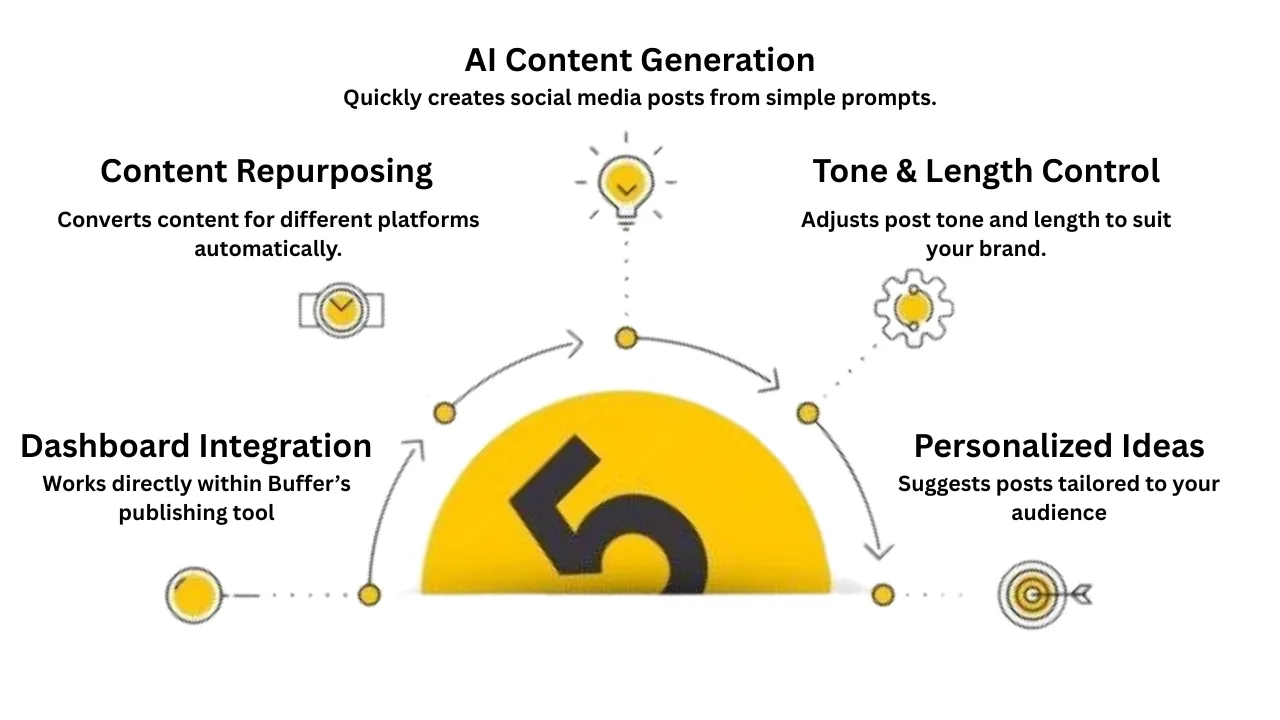
Unlike external writing assistants, Buffer AI is built directly into the Buffer dashboard. This means users don’t need to switch between tools to create and schedule content. You can brainstorm, write, edit, and post—all in one place.
2. Smart Prompting for Better Results
The Buffer AI tool works through simple text prompts. The better you describe what you need—like the platform, target audience, or tone—the better the results. For example, typing “Write a LinkedIn post about sustainable marketing with a professional tone” prompts Buffer AI to craft a polished, relevant post instantly.
3. Repurposing and Refining Content
One of the standout features of Buffer AI is its ability to repurpose old content. If you have a well-performing blog post, you can use Buffer AI to turn it into a series of social media snippets or carousel captions. This saves time and ensures your best content keeps working for you.
4. Tone and Style Adjustments
Every platform has its own language. A playful Instagram caption might not fit LinkedIn’s tone, and Buffer AI understands that. With a single click, it can adjust your message to sound more professional, friendly, or concise depending on your audience.
Key Features of Buffer AI Tool
1. Content Generation
When creativity runs dry, Buffer AI helps you brainstorm fresh post ideas. You can ask it to come up with 10 Instagram caption ideas for a travel brand or write promotional tweets for a new product launch.
2. Rewriting and Optimization
If your post doesn’t sound right, Buffer AI can rephrase it, make it more engaging, or shorten it for a different platform. The AI understands social media nuances like hashtags, emojis, and tone.
3. Cross-Platform Customization
The Buffer AI tool tailors content to fit the style and length of each platform. A 1,000-character LinkedIn post can be converted into a concise 280-character tweet without losing its meaning.
4. In-App Accessibility
You don’t need to open a new window or app. Buffer AI sits right inside your posting dashboard, so you can write, edit, and schedule without interruptions.
5. Repurposing Capabilities
Turn one blog into ten different social posts, or transform a customer testimonial into multiple engaging captions. With Buffer AI, one piece of content can fuel your social calendar for weeks.
6. Real-Time Editing and Polishing
Whether you want to make your caption shorter, funnier, or more formal, Buffer AI gives you quick editing buttons—“shorten,” “expand,” “rephrase,” and “change tone.
Benefits of Using Buffer AI
1. Saves Time and Energy
The biggest benefit of Buffer AI is how much time it saves. What used to take hours—brainstorming, writing, editing—now takes minutes. You can focus on strategy and engagement instead of getting stuck on wording.
2. Boosts Creativity
Contrary to the myth that AI stifles creativity, Buffer AI tool actually enhances it. It sparks new ideas and helps you overcome writer’s block. Even if you don’t use its exact output, it can inspire you to craft better content.
3. Consistent Brand Voice
Buffer AI learns from your preferences and maintains consistency in tone across posts. This ensures your audience recognizes your brand voice, whether you’re posting on LinkedIn or TikTok.
4. Cost-Effective Solution
Hiring a full-time content creator or copywriter isn’t always feasible for small businesses. Buffer AI offers a cost-effective alternative that delivers quality content quickly.
5. Easy for Beginners
Even if you’re new to social media marketing, Buffer AI makes the process simple. You don’t need to be a professional writer—just describe what you need, and the AI does the heavy lifting.
Use Cases for Buffer AI
Small Businesses: Generate regular, professional social posts without hiring a marketing team.
Content Creators: Keep up with frequent posting schedules and maintain consistent engagement.
Agencies: Manage multiple client accounts efficiently with unique content tailored for each.
Nonprofits: Use Buffer AI to write compelling messages that inspire action and donations.
Freelancers: Quickly generate portfolio promotions, client updates, and personal branding posts.
In every scenario, Buffer AI acts as a supportive partner that adapts to your workflow and audience.
Limitations to Keep in Mind
While Buffer AI is powerful, it’s not flawless. AI-generated content still requires human judgment. It may occasionally sound generic or miss emotional nuances. That’s why it’s important to review and tweak outputs before posting.
Also, Buffer AI can’t fully replace personal storytelling or firsthand experience. The magic happens when you combine its efficiency with your authenticity.
Explore more tips on boosting social media engagement
Tips for Getting the Most Out of Buffer AI
Be Specific with Prompts – The more detail you provide, the better the results.
Edit and Personalize – Always add your human touch.
Repurpose High-Performing Posts – Use Buffer AI to expand your best content.
Test Different Styles – Try formal, funny, or informative tones to see what resonates.
Stay Updated – Buffer frequently enhances its AI features, so explore new capabilities.

Why Buffer AI Stands Out
What makes Buffer AI tool truly special is its balance between automation and authenticity. It doesn’t just churn out robotic content—it collaborates with you. The tool’s goal is not to replace your creativity but to enhance it.
Unlike generic writing tools, Buffer AI tool is designed specifically for social media, meaning it understands trends, platform behaviors, and audience engagement dynamics. Whether you’re scheduling posts for next week or brainstorming captions for today, Buffer AI fits seamlessly into your routine.
In a digital landscape where time, creativity, and consistency are everything, Buffer AI tool has emerged as a game-changer. It empowers individuals and businesses to communicate effectively without the usual stress of content creation.
By integrating smart AI technology directly into the Buffer platform, the Buffer AI tool bridges the gap between creativity and productivity. It helps you post with confidence, connect authentically, and grow sustainably
Explore Buffer’s AI-powered social media solutions




No comment